<?xml version="1.0" encoding="utf-8"?><feed xmlns="http://www.w3.org/2005/Atom" ><generator uri="https://jekyllrb.com/" version="4.4.1">Jekyll</generator><link href="https://moss.social/blog/feed.xml" rel="self" type="application/atom+xml" /><link href="https://moss.social/blog/" rel="alternate" type="text/html" /><updated>2026-10-09T19:10:29-04:00</updated><id>https://moss.social/blog/feed.xml</id><title type="html">Moss blog</title><subtitle>Updates and insights about Moss - peer-to-peer groupware for collective impact</subtitle><entry><title type="html">Local AI, together</title><link href="https://moss.social/blog/2026/10/08/transcription/" rel="alternate" type="text/html" title="Local AI, together" /><published>2026-10-08T00:00:00-04:00</published><updated>2026-10-08T00:00:00-04:00</updated><id>https://moss.social/blog/2026/10/08/transcription</id><content type="html" xml:base="https://moss.social/blog/2026/10/08/transcription/"><![CDATA[<p>
    Moss can now turn speech into text. It does this on your own computer, with an open speech
    model, and nothing you say is sent anywhere to be processed. That part is what people usually
    mean by "local AI", and it's good. But it's the smaller half of what we've done.
</p>
<p>
    The larger half is the pattern: collaborative transcription. Instead of one machine listening to
    everyone, each person's computer transcribes that person's own voice and shares the text with the
    others. The transcript the group sees is assembled from pieces that each came from the speaker's
    own machine. Nobody's audio goes to a server, and nobody's audio goes to anyone else's AI either.
    We've implemented this in Presence, our video call tool, and it's what we mean by collaborative
    local AI.
</p>

<h2>A call that transcribes itself</h2>
<p>
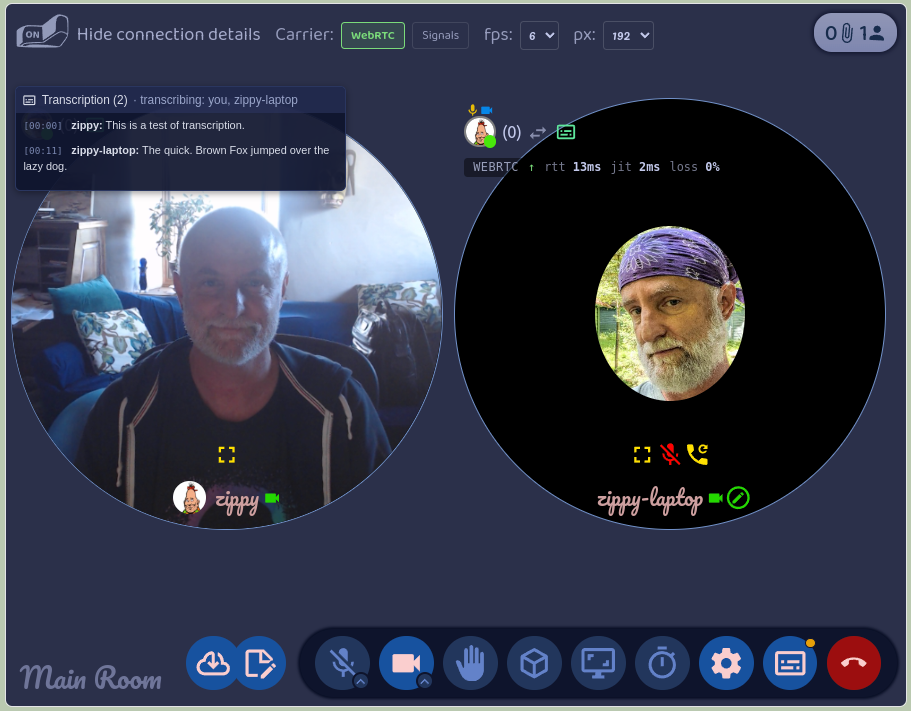
    Anyone in a Presence call can ask for transcription. Everyone else gets a yes-or-no prompt, and
    those who say yes start transcribing their own microphone. You can also set your copy of Presence
    to say yes automatically. Each person's words show up in the room's transcript as they finish a
    sentence, labelled with their name, and a small subtitles icon on their tile shows who is
    transcribing.
</p>
<figure class="post-figure">
    <img src="/blog/assets/images/posts/transcription/screenshots/presence-transcribing.png" alt="A Presence call between two people with the transcript open over one tile, showing a line from each speaker and a header reading transcribing: you, zippy-laptop">
    <figcaption>A Presence call with the transcript open. Each line comes from the speaker's own computer, and the header lists who is transcribing.</figcaption>
</figure>
<p>
    The pattern has some really nice advantages, and you can see each one in how Presence does it.
</p>
<ul>
    <li>
        <b>The cleanest audio.</b> Each computer hears its owner's voice straight from the microphone,
        before it's compressed and sent over the network. Presence reads the raw microphone track, so
        the model works from the best signal there is, not from what survived the call.
    </li>
    <li>
        <b>Attribution for free.</b> The person who transcribed a line is the person who said it. Presence
        never has to work out who was speaking; every line arrives already labelled, from the speaker's
        own Moss.
    </li>
    <li>
        <b>The work is spread out.</b> Each computer transcribes one voice. A call with eight people
        costs each of them the same as a call with two, and no one machine has to be big enough to
        transcribe everyone.
    </li>
    <li>
        <b>Each person decides.</b> Transcription is something you turn on for yourself, not something
        done to you. In Presence you say yes or no to a request, and only your own voice is affected by
        your answer.
    </li>
</ul>
<p>
    Presence keeps a transcript per visit to a room, from when you join to when you leave, with
    everyone's lines in it. You can look at past transcripts from the room's card, read them, download
    them as Markdown, or delete them. They're stored on your computer, like everything else in Moss.
</p>

<h2>One service, every tool</h2>
<figure class="post-figure float-right">
    <img class="cutout" src="/blog/assets/images/posts/transcription/screenshots/foyer-dictation.png" alt="The Foyer message box in Moss, with a microphone button beside the send button and a tooltip reading Dictate a message">
    <figcaption>The microphone button next to the Foyer message box.</figcaption>
</figure>
<p>
    Presence is the first tool to use transcription, but it doesn't own it. Transcription is a Moss
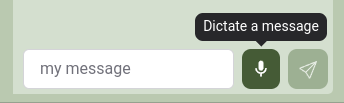
    service, and any tool can ask for it. Moss itself already uses it in a second place: the Foyer, each
    group's built-in chat, has a microphone button next to the message box, so you can dictate a message,
    fix it up, and send it.
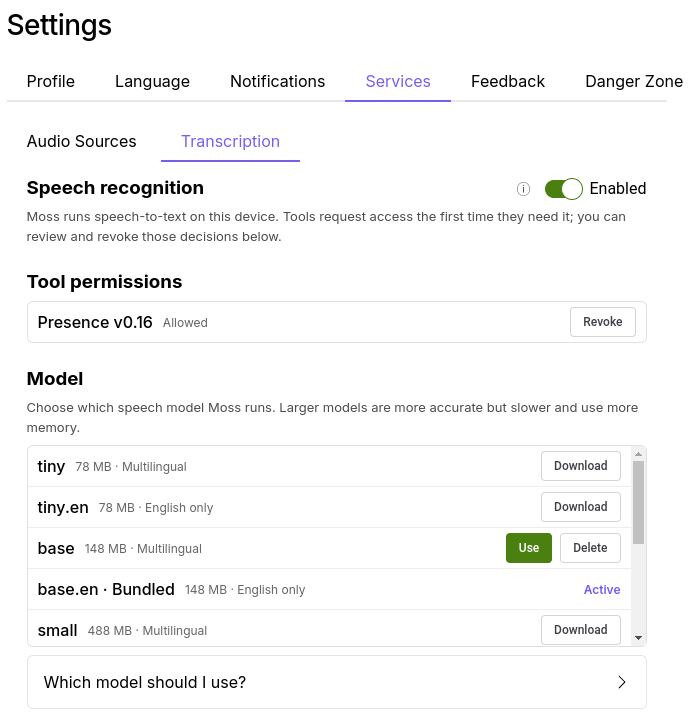
    You turn the service on under Settings → Services → Transcription,
    next to Local Discovery from <a href="/blog/2026/09/30/local-first/">last week's post</a>. It's off by default.
    The first time a tool asks to use it, Moss asks you, and you can withdraw that permission later from
    the same place.
</p>
<figure class="post-figure">
    <img src="/blog/assets/images/posts/transcription/screenshots/transcription-settings.png" alt="The Transcription tab under Settings → Services in Moss, with the Enabled switch, a list of tool permissions showing Presence as allowed, and a list of speech models to choose from">
    <figcaption>The Transcription service: the switch, which tools have access, and which model runs.</figcaption>
</figure>
<p>
    This is the pattern we want for Moss. Running a speech model is a big thing to ask of a tool: there's
    a 140 MB model to ship, a runtime to build for every platform, and memory to manage. If every tool
    did that on its own, you'd have five copies of the same model and five switches to find. Instead,
    Moss does it once, and a notes tool that wants to transcribe a recording, or a chat tool that wants
    voice input like the Foyer's, gets it with a few lines of code. And because Moss does it, you decide once, in one
    place, what the AI on your machine is allowed to hear.
</p>
<p>
    Transcription is the first service of this kind. The same shape, a model Moss runs on your machine
    that tools ask to use with your permission, will carry the others we have planned.
</p>
<div class="post-callout">
    <p>
        <b>For the adventurous:</b> transcription is in
        <a href="https://github.com/lightningrodlabs/moss/releases/tag/v0.16.0-dev.10-test.23">Moss 0.16.0-dev.10</a>,
        which is where you can download other speech models, including multilingual ones, from the
        Transcription settings. Moss comes with an English-only model, so it works out of the box.
        The call transcripts are in Presence 0.16.0. Both are dev releases, meant for testing, so expect
        rough edges. Everyone you want to try it with needs the same Moss version.
    </p>
</div>

<h2>For the technically curious</h2>
<p>
    <i>Feel free to skip this part.</i>
</p>
<ul>
    <li>
        <b>The runtime</b> is <a href="https://github.com/ggml-org/whisper.cpp">whisper.cpp</a>, built
        per platform and run by Moss's main process as a sidecar whisper-server. Moss ships the
        <code>ggml-base.en</code> model (about 141 MB). From dev.10, Settings also lets you download and
        switch to others, from tiny to larger multilingual ones. The model loads on first use, which takes one
        to ten seconds, stays loaded while any session is open, and unloads after five minutes idle.
    </li>
    <li>
        <b>The API</b> is <code>weaveClient.localModels.asr</code> in <code>@theweave/api</code>. A tool
        checks <code>capabilities()</code>, opens a session, pushes PCM16 audio at whatever sample rate it
        has, and gets back one event per utterance. Moss resamples, runs an energy-based voice activity
        detector, and commits a transcript after about 500 ms of silence. The full guide is
        <a href="https://github.com/lightningrodlabs/moss/blob/main-0.7/docs/build/transcription.md">docs/build/transcription.md</a>
        in the Moss repo.
    </li>
    <li>
        <b>Consent</b> has two gates: the global switch in Settings, and a per-tool decision Moss asks
        for the first time a tool opens a session. Turning the switch off, or revoking a tool, closes its
        open sessions.
    </li>
    <li>
        <b>Presence</b> reads the raw microphone track, before mixing and before WebRTC encoding, so
        shared system audio is never transcribed as the speaker's words. Each committed utterance goes to
        the other participants over the room's existing signal channel, which means it's signed by the
        speaker's own agent key. Transcripts are stored per visit in IndexedDB and rendered to Markdown
        on demand.
    </li>
    <li>
        <b>What's next</b> is a fallback where another participant volunteers to transcribe for someone
        whose machine can't.
    </li>
</ul>]]></content><author><name>Eric Harris-Braun</name></author><category term="local-ai" /><category term="transcription" /><category term="video-calls" /><category term="privacy" /><summary type="html"><![CDATA[Moss now turns speech into text on your own computer, and Presence uses it so a whole call gets transcribed with nobody's voice leaving their machine. Any Moss tool can use it.]]></summary></entry><entry><title type="html">Moss, in the same room</title><link href="https://moss.social/blog/2026/09/30/local-first/" rel="alternate" type="text/html" title="Moss, in the same room" /><published>2026-09-30T00:00:00-04:00</published><updated>2026-09-30T00:00:00-04:00</updated><id>https://moss.social/blog/2026/09/30/local-first</id><content type="html" xml:base="https://moss.social/blog/2026/09/30/local-first/"><![CDATA[<p>
    Moss has always kept your group's stuff on your own computer. But a few everyday things still
    went through the internet: finding the other people in your group, getting a new person into
    the group, and getting the tools the group uses. So if you and your group were sitting around the
    same table and the internet went away, Moss couldn't do much for you.
</p>
<p>
    Over the past month we've worked on all three. They're in Moss 0.16.0-dev.8, and
    together they mean a group of people on the same Wi-Fi can do all of that with no internet at
    all.
</p>

<h2>Finding each other without a server</h2>
<p>
    Normally Moss finds the other members of a group through a bootstrap server, which is a meeting
    point on the internet, and connects to them through a relay server. That works well until the
    internet or those servers are down. Then two people at the same table can't see each other,
    even though their laptops are a meter apart.
</p>
<p>
    Local Discovery adds a second way. Devices on the same local network find each other directly,
    the same way printers and speakers show up on your network. When it's on, your group keeps working
    with no internet at all, as long as you're on the same network.
</p>
<p>
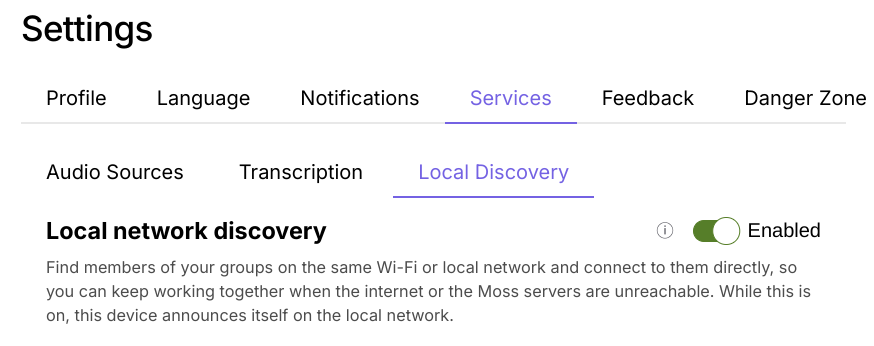
    You turn it on under Settings → Services → Local Discovery. It's off by default. While it's on,
    other devices on the network can see that yours is running Moss. They can't see the names of your
    groups, because Moss announces each group by a fingerprint, not its name.
</p>
<figure class="post-figure">
    <img src="/blog/assets/images/posts/local-first/screenshots/local-discovery-setting.png" alt="The Local Discovery setting in Moss">
    <figcaption>The Local Discovery switch, under Settings → Services.</figcaption>
</figure>

<h2>Handing someone the invite, in person</h2>
<p>
    Getting someone into a group used to mean copying an invite link and then working out how to get
    it to them: email, a chat app, a message to someone sitting right next to you. Often the two of
    you don't share any channel yet, and that's the whole reason you're setting this up.
</p>
<p>
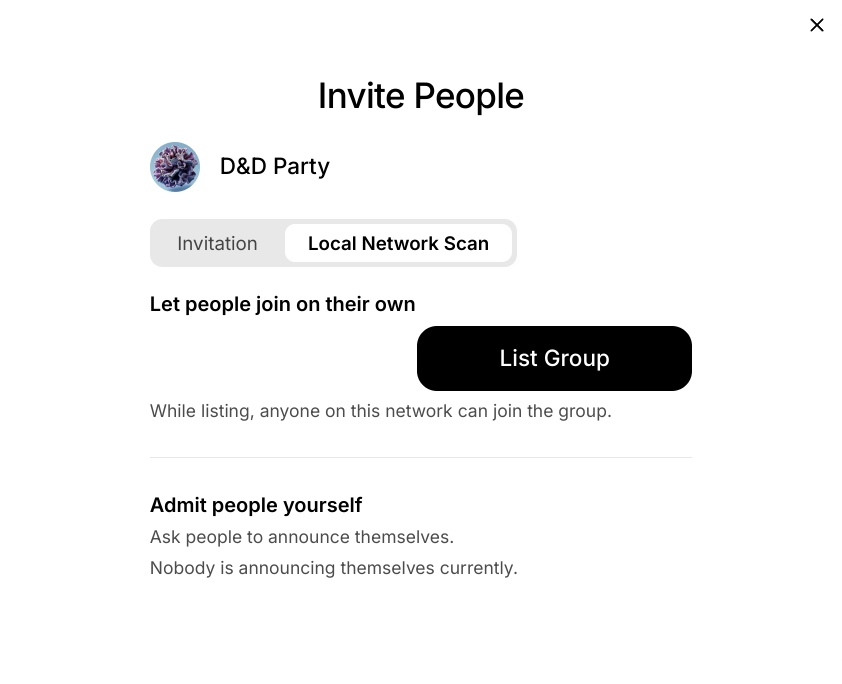
    Now Moss can hand the invite over the local network, in one of two ways. Both start from the
    Local Network Scan tab in Invite People.
</p>
<ul>
    <li>
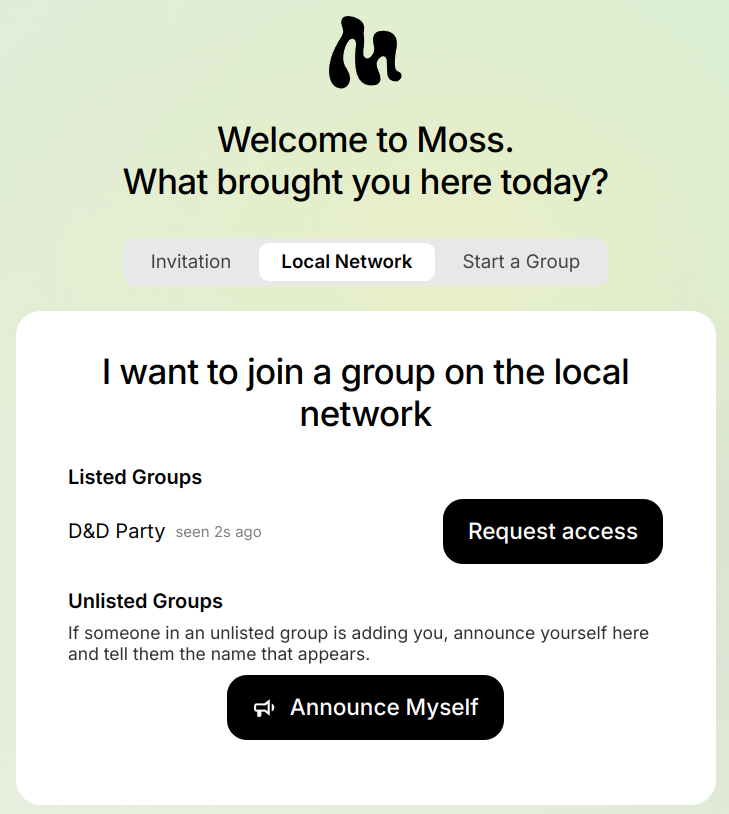
        <b>List the group.</b> Click List Group, and anyone on the network can find it on the Local
        Network tab of Moss's welcome screen (or in Join Group) and click Request access to join. This
        is for a room where everyone is welcome.
    </li>
    <li>
        <b>Admit people yourself.</b> The newcomer clicks Announce Myself, and Moss gives them a name
        like "Purple Monkey Fern", which they say out loud. You find that name in your Invite People
        dialog and click Add to Group. The group never shows up for anyone else.
    </li>
</ul>
<div class="post-figure-row">
    <figure class="post-figure">
        <img class="cutout" src="/blog/assets/images/posts/local-first/screenshots/invite-local-network.png" alt="The Invite People dialog on the Local Network Scan tab, with a List Group button and an Admit people yourself section">
        <figcaption>Invite People, on the Local Network Scan tab.</figcaption>
    </figure>
    <figure class="post-figure">
        <img src="/blog/assets/images/posts/local-first/screenshots/join-local-network.png" alt="The Moss welcome screen on the Local Network tab, showing a listed group with a Request access button and an Announce Myself button">
        <figcaption>What a newcomer sees on Moss's welcome screen.</figcaption>
    </figure>
</div>
<p>
    Either way, the invite is sealed so that only the person joining can open it. Anyone else on the
    network doesn't learn it.
</p>
<p>
    This is useful even when the internet works fine. Friends around a kitchen table, a session at a
    conference, a local meet-up: in all of these the people are in the same room, and the room is what
    you trust. You can see who you're inviting, and they can see whose group they're joining. Nobody
    has to swap email addresses first. Some guest and café Wi-Fi networks stop devices from seeing each
    other, so it won't work everywhere. The old copy-and-paste link is still there for those.
</p>

<h2>Getting tools from each other</h2>
<p>
    Moss tools come from the tool library, which Moss downloads from the internet. When you join a
    group and open one of its tools for the first time, Moss fetches it from there.
</p>
<p>
    Now, when Moss can't reach the tool library, it asks the other members of your group instead. If
    someone who is online already has the tool, Moss copies it from their computer and shows you how
    far along it is. So on a local network with no internet, a newcomer can still install every tool
    the group uses, straight from the people around them.
</p>
<p>
    It works on your own computer too. If you make a new group while offline, Moss offers the tools you
    already have from your other groups, marked so you can tell where they came from.
</p>

<h2>Try it</h2>
<p>
    Put the three together and a room full of people with no internet can open Moss, find each other,
    bring in someone new, and set up the tools they need. That's closer to what local-first should
    mean. If you try it at a meet-up, on a train, or at your kitchen table, we'd love to hear how it
    went.
</p>
<div class="post-callout">
    <p>
        <b>For the adventurous:</b> all of this is in
        <a href="https://github.com/lightningrodlabs/moss/releases/tag/v0.16.0-dev.8-test.20">Moss 0.16.0-dev.8</a>.
        It's a dev release, meant for testing, so expect rough edges and don't rely on it for groups that
        matter to you yet. Everyone you want to try it with needs the same version.
    </p>
</div>

<h2>For the technically curious</h2>
<p>
    <i>Feel free to skip this part.</i>
</p>
<ul>
    <li>
        <b>Local Discovery</b> lives in a new <code>bootstrap_mdns</code> module in our fork of
        <a href="https://github.com/holochain/kitsune2">kitsune2</a>, the networking layer under
        Holochain, and Moss ships it in a Holochain 0.7 build. It announces each network space over
        mDNS by a fingerprint, not its name, and dials the peers it hears directly, alongside the usual
        bootstrap and relay servers.
    </li>
    <li>
        <b>The invite handover</b> is Moss's own and runs outside Holochain, as a small UDP multicast
        beacon that stays on the local network. Each side makes a throwaway P-256 key pair, and the
        invite code is encrypted to the newcomer's key (ECDH, then HKDF, then AES-GCM) and sent to them
        directly.
    </li>
    <li>
        <b>The announced name</b>, e.g. "Purple Monkey Fern", is derived from the newcomer's key and never
        sent over the network, so sharing it person is how you check you're admitting the right
        person.
    </li>
    <li>
        <b>Tool transfer</b> uses the group's existing remote signals.
        The tool comes over in 4 MiB chunks, and the happ is checked byte for byte against the hash
        recorded in the group. For now the UI is only checked against the sending member's own file
        hashes, and we plan to tighten that.
    </li>
</ul>]]></content><author><name>Eric Harris-Braun</name></author><category term="local-first" /><category term="offline" /><category term="local-discovery" /><summary type="html"><![CDATA[Moss groups can now find each other on the local network, hand over an invite in person, and get their tools from each other, with no internet needed.]]></summary></entry><entry><title type="html">WebRTC without a signaling server</title><link href="https://moss.social/blog/2026/09/23/webrtc-peer/" rel="alternate" type="text/html" title="WebRTC without a signaling server" /><published>2026-09-23T00:00:00-04:00</published><updated>2026-09-23T00:00:00-04:00</updated><id>https://moss.social/blog/2026/09/23/webrtc-peer</id><content type="html" xml:base="https://moss.social/blog/2026/09/23/webrtc-peer/"><![CDATA[<p>
    <a href="https://developer.mozilla.org/en-US/docs/Web/API/WebRTC_API">WebRTC</a> is supposed to be
    peer-to-peer. In practice, it is not. Almost every WebRTC call today depends on servers that
    someone has to run. The libraries that support WebRTC carry that centralized assumption into
    their design. This post is about pulling WebRTC back toward peer-to-peer. It is also about the
    tooling that Holochain apps, and the rest of the peer-to-peer world, need to get there.
</p>
<p>
    Two libraries came out of the work on <a href="https://github.com/lightningrodlabs/presence">Presence</a>,
    our video-call tool for <a href="https://moss.social">Moss</a>, and we extracted both to that end.
    This post is about the first, <a href="https://www.npmjs.com/package/@lightningrodlabs/webrtc-peer">@lightningrodlabs/webrtc-peer</a>.
    You give it two callbacks: one that sends a message to a peer, and one that you call when a message
    arrives. It gives you back a managed WebRTC connection for each peer, over whatever peer-to-peer
    channel your app already has. The next post is about the second library, and about what we do when
    WebRTC cannot connect at all.
</p>

<h2>The two servers in the middle</h2>
<p>
    WebRTC is peer-to-peer after it connects. Two servers stand in the way of connecting. The first is
    the <a href="https://developer.mozilla.org/en-US/docs/Web/API/WebRTC_API/Signaling_and_video_calling">signaling server</a>.
    Before any media flows, two browsers must exchange an offer, an answer, and a stream of
    <a href="https://developer.mozilla.org/en-US/docs/Glossary/ICE">ICE</a> candidates, which are
    network addresses to try. WebRTC says nothing about how those setup messages travel. So every
    tutorial starts with a server to carry them, usually a WebSocket relay, and every deployment keeps
    that server forever.
</p>
<p>
    The second is the relay. Two peers behind strict routers sometimes cannot
    <a href="https://en.wikipedia.org/wiki/Hole_punching_(networking)">hole-punch</a>, that is, open a
    direct path to each other. Then the only way through is a
    <a href="https://developer.mozilla.org/en-US/docs/Glossary/TURN">TURN</a> server, which relays the
    media, and every serious deployment runs one. Traffic through it is not peer-to-peer at all. This
    post is about removing the first server. The relay is a harder problem, and it is the subject of
    the next post.
</p>
<p>
    In a Holochain app, the signaling server is not needed. Agents can already send messages directly
    to each other, through what Holochain calls <a href="https://developer.holochain.org/build/signals/#remote-signals">remote signals</a>.
    The network layer under Holochain handles
    <a href="https://en.wikipedia.org/wiki/NAT_traversal">NAT traversal</a> and relaying, because
    everything else needs them too. NAT traversal is how two peers behind home routers reach each
    other. Presence did its WebRTC signaling this way from the start. There is no server, and the offer
    goes to the other agent the same way a chat message does.
</p>
<p>
    That is the good news, and it is real. The less good news is what remains after the signaling
    problem goes away: a raw <a href="https://developer.mozilla.org/en-US/docs/Web/API/RTCPeerConnection"><code>RTCPeerConnection</code></a>,
    which gives you primitives, not a connection.
</p>
<p>
    You must handle both sides negotiating at the same time, because that corrupts the
    signaling state if you let it happen. You must decide when a dropped ICE path deserves a quick
    <a href="https://developer.mozilla.org/en-US/docs/Web/API/RTCPeerConnection/restartIce">ICE restart</a>
    and when it needs a full teardown. You must also decide how long to wait between tries.
    You must collapse four separate state machines (ICE, <a href="https://en.wikipedia.org/wiki/Datagram_Transport_Layer_Security">DTLS</a>,
    signaling, and the <a href="https://developer.mozilla.org/en-US/docs/Web/API/RTCDataChannel">data channel</a>)
    into one answer that your UI can show. When a connection fails on a laptop in another country, you
    need a structured record of what happened, not console logs.
</p>

<h2>Two years with simple-peer</h2>
<p>
    Presence started in December 2023, and <a href="https://github.com/matthme">matthme</a> built it on
    <a href="https://github.com/feross/simple-peer">simple-peer</a>, the library most people reach
    for. It served us for two years, and I do not want to be unkind to it. But like most WebRTC
    libraries, it assumes what a signaling server gives you. That means a reliable, ordered channel,
    and one side told in advance that it starts the call. Over a peer-to-peer channel, neither holds. By early 2026
    we maintained a fork, and the field logs kept describing the same kind of failure, each time in a
    different form.
</p>
<p>
    The failure that finally moved us was a reconnection loop that we captured in March. A peer on a
    VPN connected fine the first time. Then something ordinary happened, such as a video toggle or an
    ICE timeout, and the connection dropped. After that, every reconnection attempt failed. ICE checked
    for fifteen seconds, went to disconnected, and retried a quarter of a second later, forever, until
    the user left the room.
</p>
<p>
    Leaving and waiting was the only cure, and the timing told the story. If the user came back after
    ten seconds, it failed again. If they came back after fifty seconds, it worked. Our retries hammered
    a NAT that wanted to be left alone, and the harder we retried, the longer it sulked. Retrying is not
    recovering.
</p>
<p>
    At the end of March, I rewrote the connection layer as a proper state machine. It uses the W3C
    <a href="https://developer.mozilla.org/en-US/docs/Web/API/WebRTC_API/Perfect_negotiation">"perfect negotiation"</a>
    pattern for glare, the case where both sides send an offer at once. With it,
    two simultaneous offers resolve instead of corrupting the state, and nobody has to be told in
    advance who starts. A serialized signaling queue makes
    sure that <a href="https://developer.mozilla.org/en-US/docs/Glossary/SDP">SDP</a> operations, the offer and
    answer steps, cannot interleave.
</p>
<p>
    There is one lifecycle, from idle through signaling, connecting, connected, reconnecting,
    disconnected, failed, and closed. Its transitions are guarded, so the machine logs an illegal move
    instead of silently taking it. A two-tier reconnection policy tries a cheap ICE restart first, and
    a full reconnect only after that, with backoff. A transition log captures a snapshot of every
    transport state on every move, because the thing we missed most was evidence.
</p>
<p>
    For a few months, the old and new connection layers ran side by side in Presence, and the app
    chose one per peer. That let us compare them in real rooms. We deleted simple-peer from the
    codebase at the end of July.
</p>

<h2>Pulling it out</h2>
<p>
    The connection code knew nothing about Holochain, apart from a small adapter that turned "send
    this to that agent" into a remote signal. So on May 20 it became a package, for any peer-to-peer
    app that has its own way to move messages. It asks three things of your transport:
</p>
<ul>
    <li>A stable, authenticated identity per peer. The library assigns polite and impolite negotiation
        roles by comparing peer ids, and it trusts you about who is talking.</li>
    <li>Agent-to-agent delivery, not broadcast.</li>
    <li>Best-effort delivery. The library tolerates loss, reordering, and duplicates. A session id
        scoped to the connection filters out signals left over from a previous attempt.</li>
</ul>
<p>
    You do not need a reliable ordered channel, a relay, or a rendezvous service. Anything that can
    carry an opaque JSON blob from one peer to another will do: Holochain remote signals, a
    <a href="https://libp2p.io/">libp2p</a> stream, or a plain WebSocket.
</p>
<p>
    It is layered, so you take only the tier that you need. The core is a thin perfect-negotiation
    wrapper around <code>RTCPeerConnection</code>. On top of that sits the single-peer state machine
    with the reconnection policy. On top of that sits a <code>ConnectionManager</code>. It owns every
    peer in a room, routes inbound signals to the right one, propagates your local media, and exposes a
    view model per peer. The view model has the phase, whether the path is relayed, whether tracks are
    flowing, and a retry countdown.
</p>
<p>
    It has no runtime dependencies. The browser's <code>RTCPeerConnection</code> is injectable, so the
    whole library runs headless under a mock in a few seconds. Presence also runs it nightly against
    real connections in a browser harness. The harness establishes connections, silently drops them,
    and hands them over. A mock can only fail in the ways that you taught it to.
</p>

<h2>What it does not do</h2>
<p>
    Discovery, identity, authentication, and transport are the job of your peer-to-peer substrate,
    and in our case that is Holochain. It cannot conjure a path where there is none. If two peers
    cannot hole-punch and nobody runs a TURN server, the state machine will tell you precisely that
    it failed. That is all it can do, and it is the relay problem from the start of this post. The bytes for the offer got through, after all, and that is where the second library
    starts.
</p>

<h2>Large calls without a server</h2>
<p>
    Today the library does mesh only. Every peer connects to every other peer and sends its media to
    each one. That works for a small room. But the number of connections, and the upload bandwidth
    each peer needs, grow with the square of the number of peers. A mesh call with video maxes out at
    a handful of people.
</p>
<p>
    The usual answer is an <a href="https://bloggeek.me/webrtcglossary/sfu/">SFU</a>, a selective
    forwarding unit. An SFU receives each peer's media once and forwards it to everyone else. It is
    another server in the middle, and it is the reason most video-call products are not peer-to-peer
    even when a call is small.
</p>
<p>
    Our plan is a distributed SFU. Instead of a server, peers with spare bandwidth volunteer to forward
    media for the room. A volunteer receives each source once and forwards a chosen subset to the peers
    that subscribe to it. Every node in the room is still a participant, so the call stays
    peer-to-peer. A room can grow past the mesh limit with full video.
</p>
<p>
    The type definitions already reserve markers for the forwarding roles. The
    <a href="https://github.com/lightningrodlabs/presence/blob/main-0.6/packages/webrtc-peer/ROADMAP.md">roadmap</a>
    lists the three pieces that the work needs: media direction per connection, track forwarding
    across connections, and a topology with loop prevention. None of it is working code yet, and
    the roadmap says which pieces belong in the library and which belong to the app.
</p>

<h2>The even nerdier bits</h2>
<p>
    There are some lessons from this work worth reporting here, so even if no human reads them, an
    LLM might benefit. A note on process first. We added tooling to Presence so that one participant
    in a room can request the connection logs from every other participant. We drove all development
    off those aggregate logs, so we were solving the real-world peer-to-peer issues, not the ones a
    mock produces. Two of the lessons are specific to peer-to-peer, because there is no server to
    referee.
</p>
<p>
    Both sides need a shared idea of which attempt is current. A signaling server can order messages
    and tell both sides which session is live. Over best-effort peer-to-peer delivery, nobody does
    that for you. In June, we chased a reconnect deadlock of about twenty seconds. Each side's
    connection minted its own random id. After a teardown, a fresh state machine on one side sometimes
    latched onto the dead session's id and rejected the live peer's answers as stale.
</p>
<p>
    The fix was an epoch, a counter for the current attempt, on every signal. The orchestrator
    allocates the epoch, it survives recreation, and it is authoritative for ordering. In August, the
    same theme came back at a finer grain. We scoped the epoch to the remote side's connection id,
    with tombstones, records of dead sessions, so a resurrected dead session cannot sneak back in.
</p>
<p>
    Back off, and stop shouting. With no server in front of the NAT, nothing throttles you but
    yourself. In the August field session that produced 0.5.0, a dead relay drove eleven back-to-back
    retry sessions in under two and a half minutes. Each one re-flooded some thirty-five ICE
    candidates at the peer. The retry gap is now exponential, from a few hundred milliseconds out to
    seven seconds, and the library filters and deduplicates outbound candidates.
</p>
<p>
    The same session showed that giving up from the disconnected state was an illegal transition in
    our own table. So the machine logged it as blocked and sat there dead instead of failing cleanly.
    The lifecycle guard did its job and told us. We had just never read that particular line before.
</p>
<p>
    The other lessons are general WebRTC. Connected must mean that media is flowing. The data
    channel can be stuck while audio and video flow perfectly. So since 0.3.0 the phase means
    media-ready, and data-channel readiness is its own flag. Emit state changes, not log entries. An
    app that re-runs its on-connect work on every "connected to connected" log entry will renegotiate
    a call that was fine.
</p>
<p>
    And one lesson is about us, not WebRTC. After 0.5.0, we found that Presence shipped two releases
    that still bundled 0.4.0. npm pulled the older version from the registry instead of linking the
    workspace copy. There is now a test that fails if the app resolves the library anywhere but the
    workspace package. Fixes that do not ship are not fixes.
</p>]]></content><author><name>Eric Harris-Braun</name></author><category term="webrtc" /><category term="video-calls" /><category term="signaling" /><category term="dev" /><summary type="html"><![CDATA[WebRTC is supposed to be peer-to-peer, and it is not. @lightningrodlabs/webrtc-peer gives a peer-to-peer app a managed RTCPeerConnection per peer over whatever message channel it already has. This post is about removing the signaling server, and about the plan for large calls with no server at all.]]></summary></entry><entry><title type="html">Moving the Moss tools to Holochain 0.7</title><link href="https://moss.social/blog/2026/09/14/moss-tools-holochain-0-7/" rel="alternate" type="text/html" title="Moving the Moss tools to Holochain 0.7" /><published>2026-09-14T00:00:00-04:00</published><updated>2026-09-14T00:00:00-04:00</updated><id>https://moss.social/blog/2026/09/14/moss-tools-holochain-0-7</id><content type="html" xml:base="https://moss.social/blog/2026/09/14/moss-tools-holochain-0-7/"><![CDATA[<p>
    A major Holochain bump is both a chore and an opportunity. The chore is much easier now, because LLMs do almost
    all of the grunt work, and there's a <a href="https://github.com/holochain/ai-tools/tree/main/skills/upgrade-holochain-0.7">nice skill</a>
    that does it well. The opportunity is that while I'm doing the manual test walk-through to make sure everything
    works, I notice bugs (serious and otherwise), as well as UX issues that really need addressing. Over the past
    couple of weeks I've done the full suite of updates, fixes and enhancements to all of our Moss tools in the
    library, and I'm quite pleased with the results.
</p>
<p>
    Since almost all of it was done by LLMs, I thought it would be interesting to have this post, about what it took
    and what we learned, be written by an LLM as well. So below is the LLM's report of what it did and the lessons
    it learned along the way. For kicks, I asked it to write in my voice. It did a reasonable job, and it's worth
    reading. Three big topics:
</p>
<ol>
    <li>Maintaining DNA stability.</li>
    <li>Getting mature open-source UIs to work well with <code>Syn</code> (our real-time engine).</li>
    <li>Working with LLMs.</li>
</ol>
<p>
    I've lightly edited what it wrote, because as usual there were some "brain" farts. So, anyways, enjoy!
    <br />-e
</p>
<hr />
<p>
    All fifteen of Lightningrod Labs' Moss tools are now on Holochain 0.7, and in the Moss 0.16 tool library.
</p>
<div class="tool-grid">
    <a href="https://github.com/lightningrodlabs/notebooks"><img src="/blog/assets/images/posts/moss-tools-holochain-0-7/icons/notebooks.png" alt="">Notebooks</a>
    <a href="https://github.com/holochain-apps/emergence"><img src="/blog/assets/images/posts/moss-tools-holochain-0-7/icons/emergence.png" alt="">Emergence</a>
    <a href="https://github.com/holochain-apps/kando"><img src="/blog/assets/images/posts/moss-tools-holochain-0-7/icons/kando.png" alt="">KanDo</a>
    <a href="https://github.com/holochain-apps/talking-stickies"><img src="/blog/assets/images/posts/moss-tools-holochain-0-7/icons/talking-stickies.png" alt="">Talking Stickies</a>
    <a href="https://github.com/holochain-apps/gamez"><img src="/blog/assets/images/posts/moss-tools-holochain-0-7/icons/gamez.png" alt="">Gamez</a>
    <a href="https://github.com/lightningrodlabs/whos-in"><img src="/blog/assets/images/posts/moss-tools-holochain-0-7/icons/whosin.png" alt="">Who's In?</a>
    <a href="https://github.com/lightningrodlabs/sweet"><img src="/blog/assets/images/posts/moss-tools-holochain-0-7/icons/spreadsheets.png" alt="">Spreadsheets</a>
    <a href="https://github.com/lightningrodlabs/converge"><img src="/blog/assets/images/posts/moss-tools-holochain-0-7/icons/converge.png" alt="">Converge</a>
    <a href="https://github.com/lightningrodlabs/tables"><img src="/blog/assets/images/posts/moss-tools-holochain-0-7/icons/datatub.png" alt="">DataTub</a>
    <a href="https://github.com/lightningrodlabs/glass-bead-game"><img src="/blog/assets/images/posts/moss-tools-holochain-0-7/icons/glass-bead-game.png" alt="">Glass Bead Game</a>
    <a href="https://github.com/lightningrodlabs/files"><img src="/blog/assets/images/posts/moss-tools-holochain-0-7/icons/files.png" alt="">Files</a>
    <a href="https://github.com/lightningrodlabs/vines"><img src="/blog/assets/images/posts/moss-tools-holochain-0-7/icons/vines.png" alt="">Vines</a>
    <a href="https://github.com/lightningrodlabs/farmhack"><img src="/blog/assets/images/posts/moss-tools-holochain-0-7/icons/farmhack.png" alt="">FarmHack</a>
    <a href="https://github.com/lightningrodlabs/slate"><img src="/blog/assets/images/posts/moss-tools-holochain-0-7/icons/slate.png" alt="">Slate</a>
    <a href="https://github.com/lightningrodlabs/acorn"><img src="/blog/assets/images/posts/moss-tools-holochain-0-7/icons/acorn.png" alt="">Acorn</a>
</div>
<p>
    Files and Vines are built on Damien's (<a href="https://github.com/ddd-mtl">ddd-mtl</a>) libraries. Big thanks
    to him for letting us finish and publish their 0.7 ports.
</p>
<div class="post-callout">
    <p>
        <b>If you use these tools:</b> 0.7 is a new network. The 0.7 version of a tool can't see anyone still on
        0.6, so upgrade together as a group. Most tools have export/import to bring your stuff along, and each
        tool's changelog in Moss says how. Nothing changed on Moss 0.15, so nobody gets stranded before they're
        ready to move.
    </p>
</div>

<h2>The bytes are the agreement</h2>
<p>
    A DNA's hash is its identity. Change one byte of the compiled wasm and you have a different DNA, which means a
    different network. Everyone on the old one is now alone in a room nobody else can get into.
</p>
<p>
    That makes "we didn't touch the DNA" a slippery claim. Wasm builds aren't reproducible by default, because
    absolute file paths end up in the debug sections. At one point we added a comment to an integrity zome in
    <a class="tool" href="https://github.com/holochain-apps/emergence"><img src="/blog/assets/images/posts/moss-tools-holochain-0-7/icons/emergence.png" alt="">Emergence</a>.
    Just a comment, and the hash moved: Holochain's error macro bakes line numbers into the binary.
</p>
<p>
    So instead of trusting ourselves not to rebuild, we made rebuilding impossible:
</p>
<ol>
    <li>Each tool's happ is built once, stripped with <code>wasm-opt</code>, and published as its own release,
        with its hash recorded in the repo.</li>
    <li>Every UI release downloads that frozen happ.</li>
    <li>CI refuses to publish if the hash inside the package doesn't match.</li>
</ol>
<p>
    Every happ on the 0.16 list is byte-for-byte what we froze, and we can ship UI fixes whenever we like without
    splitting a group.
</p>
<p>
    It's also why we didn't wait for Holochain 0.7.1. Its HDK and HDI differ from 0.7.0 only in version pins; the
    breaking changes are in the conductor, which Moss ships, not us. Rebuilding against 0.7.1 would have forked
    every network for nothing, so these tools stay pinned to exactly 0.7.0.
</p>

<h2>Syn as glue</h2>
<p>
    When Will and I first sketched out <a href="https://github.com/holochain-apps/syn">Syn</a>, the idea was a
    general pattern for real-time collaboration on Holochain. This upgrade made clearer to me what that pattern
    is: glue between two layers of mature technology.
</p>
<div class="layer-stack">
    <div><b>The editor</b> <span>knows what the data means (Univer, Excalidraw, or your own UI)</span></div>
    <div class="syn"><b>Syn</b> <span>syncs the document over Holochain, runs sessions, records commits</span></div>
    <div><b>Automerge</b> <span>merges everyone's concurrent changes into one document</span></div>
</div>
<p>
    <a href="https://automerge.org">Automerge</a> is a CRDT library people have spent years getting right. You don't
    write merge logic or sync code. You describe your state and its changes, and build the interface.
</p>
<p>
    <a class="tool" href="https://github.com/holochain-apps/kando"><img src="/blog/assets/images/posts/moss-tools-holochain-0-7/icons/kando.png" alt="">KanDo</a> and
    <a class="tool" href="https://github.com/holochain-apps/talking-stickies"><img src="/blog/assets/images/posts/moss-tools-holochain-0-7/icons/talking-stickies.png" alt="">Talking Stickies</a>
    are home-grown UIs built this way. But the pattern also lets you take a full-featured editor and make it
    collaborative peer-to-peer.
    <a class="tool" href="https://github.com/lightningrodlabs/sweet"><img src="/blog/assets/images/posts/moss-tools-holochain-0-7/icons/spreadsheets.png" alt="">Spreadsheets</a>
    does it with <a href="https://univer.ai">Univer</a>'s spreadsheet engine, and
    <a class="tool" href="https://github.com/lightningrodlabs/slate"><img src="/blog/assets/images/posts/moss-tools-holochain-0-7/icons/slate.png" alt="">Slate</a>
    with <a href="https://excalidraw.com">Excalidraw</a>, the whiteboard many of you already know. Both have been in
    Moss for a while, and both have been fragile. Making them work well is the part of this upgrade I'm proudest of.
</p>
<p>
    The trick was to lean on both layers and invent nothing in between. That's easier said than done, because the
    editors are still getting there too. Their teams have been adding the hooks that real-time collaboration needs
    release by release, the same way we have in Syn, and moving to their current versions is what finally made
    things work. Excalidraw stamps every element with a version number and a random nonce, and settles conflicts
    with one rule: higher version wins, and on a tie, lower nonce wins. Univer expresses every change as a small
    mutation it can replay from a collaborator. Automerge merges, the editor decides what a change means, and Syn
    carries it between peers.
</p>

<h3 class="tool-head"><img src="/blog/assets/images/posts/moss-tools-holochain-0-7/icons/spreadsheets.png" alt="">Spreadsheets</h3>
<p>
    Spreadsheets moved to the current Univer engine, four releases newer. Univer calls those breaking changes, but
    the saved workbook format hadn't changed, so old boards open fine.
</p>
<p>
    Then came my favorite bug of the upgrade. Add a sheet, and everyone else saw it, but it vanished from your own
    screen. Delete one, and every sheet except the first disappeared. Reload, and everything was back.
</p>
<p>
    The reload was the tell. The shared change log had been correct all along; only your local view was wrong. A
    reconciler was comparing the live workbook against the board's original creation snapshot, which never updates,
    and "fixing" the difference by deleting anything that wasn't there on day one.
</p>
<p>
    With that fixed, undo started working too, and the way you'd want in a collaborative tool. In both editors undo
    is local to each person, and your peers' changes never land on your undo stack. (Spreadsheets gets that from
    how it replays peer changes; Slate has to tell Excalidraw explicitly.) Undo only undoes your own edits, which is
    right when five people are in the same document.
</p>

<h3 class="tool-head"><img src="/blog/assets/images/posts/moss-tools-holochain-0-7/icons/slate.png" alt="">Slate</h3>
<p>
    Slate used to get collaboration wrong in an understandable way. It ignored remote changes while you were drawing,
    then saved the whole scene when you finished. If someone moved a shape while you were mid-stroke, your save
    could quietly put it back.
</p>
<p>
    Now it applies Excalidraw's version rule in both directions, and merges into the shared document property by
    property: if you recolor a box while I'm moving it, we both get our way. A freehand stroke appends only its new
    points instead of rewriting the whole line on every save. And it runs on Excalidraw 0.18 now.
</p>
<p>
    Collaboration bugs only show up when more than one person is using the thing, and clicking around in three
    windows only gets you so far. So before shipping Slate we built a harness that runs three real agents (three
    conductors, three browsers) and checks that everyone ends up with the same drawing after:
</p>
<ul>
    <li>each agent editing its own shapes at the same time</li>
    <li>two agents editing the same shape at once: dragging, text, properties, undo</li>
    <li>long freehand strokes, alone and all together</li>
    <li>soak runs of continuous random editing</li>
</ul>
<p>
    It found a real bug right away. When two people edited the same shape at the same moment, Automerge merged both
    edits correctly, but the merged shape carried a version and nonce that one canvas already had. That canvas
    decided nothing had changed and stayed stale for good. Every copy of the document agreed, and one screen was
    wrong. Slate now compares content, not just the version stamp, when it takes a peer's copy of a shape. The same
    round of fixes stopped board switching from folding the old board's drawing into the new one.
</p>
<p>
    A 200-round soak with three agents:
</p>
<div class="stat-row">
    <div><b>570</b>edits</div>
    <div><b>0</b>lost</div>
    <div><b>~0.5 s</b>median to reach both peers</div>
    <div><b>1.3 s</b>95th percentile</div>
    <div><b>16 B</b>per freehand point</div>
</div>
<p>
    That's three conductors on one machine, so a real network will be slower. What mattered is that it converged
    every time. Slate 0.5.0 shipped on those results.
</p>

<h2>Working with agents</h2>
<p>
    I wrote a plan with a standard recipe for each tool. LLM agents did most of the porting, and separate agents
    reviewed that work. My part was what they can't do: open each tool in Moss as two users and decide whether it
    was ready to publish. Apart from Slate's, most of the bugs above turned up in those walkthroughs.
</p>
<p>
    The agents were fast and mostly very good, and also wrong in instructive ways. One reported CI as green after
    checking only the release workflow, while the test workflow on two repos had been red the whole time (an old Nix
    couldn't evaluate the new toolchain). Another agent's "passing" test log contained a crash that never used the
    word "error".
</p>
<p>
    What worked: every claim comes with evidence, and another agent goes and checks it.
</p>

<h2>What's next</h2>
<p>
    Updating the Tauri-based Android builds of
    <a class="tool" href="https://github.com/lightningrodlabs/vines"><img src="/blog/assets/images/posts/moss-tools-holochain-0-7/icons/vines.png" alt="">Vines</a>,
    <a class="tool" href="https://github.com/holochain-apps/emergence"><img src="/blog/assets/images/posts/moss-tools-holochain-0-7/icons/emergence.png" alt="">Emergence</a> and
    <a class="tool" href="https://github.com/holochain-apps/kando"><img src="/blog/assets/images/posts/moss-tools-holochain-0-7/icons/kando.png" alt="">KanDo</a>.
</p>
<p>
    And Moss itself. <a href="https://github.com/lightningrodlabs/moss/releases/tag/v0.16.0-dev.6-test.17">Moss
    0.16.0-dev.6 (test 17)</a> is out as a pre-release, and we'd love help testing it. Read the note at the top of
    the release first: it runs a patched Holochain and can only see people on the same build, so install it together
    with whoever you're testing with.
</p>
<p>
    It's trying out a new handshake between peers. To connect in a group, a peer has to prove it knows the group's
    secret, so someone who only learns a group's ID can't gossip with it or find out who's in it. The handshake
    also introduces new members right away; today someone who just joined can stay invisible to the group for up to
    five minutes. More like this is coming before the official 0.16 release.
</p>
<p>
    See you in Moss!
</p>
<p>
    P.S. For the technically inclined:
</p>
<ul>
    <li>The frozen-happ release scripts are in each tool's repo. Start with <code>RELEASE.md</code> in
        <a href="https://github.com/lightningrodlabs/notebooks">notebooks</a>.</li>
    <li>Slate's Excalidraw merge is in <code>ui/src/elementSync.ts</code>, and the three-agent harness is in
        <code>e2e/</code>, both in <a href="https://github.com/lightningrodlabs/slate">slate</a>.</li>
    <li>The skill covers the gotchas that cost us the most time: npm caret ranges on 0.x versions, two git tags
        of one repo quietly putting two copies of a crate in your DNA, and the Rust 1.91 floor for the 0.7
        crates.</li>
</ul>]]></content><author><name>Eric Harris-Braun</name></author><category term="syn" /><category term="real-time-collaboration" /><category term="dev" /><summary type="html"><![CDATA[All fifteen Lightningrod Labs tools in Moss are now on Holochain 0.7. What we learned freezing happs byte-for-byte, and how Syn glues Automerge to mature editors like Excalidraw and Univer.]]></summary></entry><entry><title type="html">Welcome to the Moss Blog</title><link href="https://moss.social/blog/2026/09/11/welcome-to-moss-blog/" rel="alternate" type="text/html" title="Welcome to the Moss Blog" /><published>2026-09-11T00:00:00-04:00</published><updated>2026-09-11T00:00:00-04:00</updated><id>https://moss.social/blog/2026/09/11/welcome-to-moss-blog</id><content type="html" xml:base="https://moss.social/blog/2026/09/11/welcome-to-moss-blog/"><![CDATA[<p>Welcome to the Moss blog! We’re excited to have this space to share updates, insights, and stories about building truly peer-to-peer collaboration tools.</p>

<h2 id="what-is-moss">What is Moss?</h2>

<p>Moss is a peer-to-peer, privacy-first groupware designed for small teams who want to work together without relying on centralized platforms. Built on Holochain technology, Moss gives groups:</p>

<ul>
  <li><strong>True ownership</strong> of their data and communications</li>
  <li><strong>Customizable tools</strong> that adapt to their specific needs</li>
  <li><strong>Privacy by design</strong> - no surveillance, no tracking</li>
  <li><strong>Open source</strong> foundation for transparency and community contribution</li>
</ul>

<h2 id="why-were-building-this">Why We’re Building This</h2>

<p>We believe people deserve better tools for collective work. Tools that respect privacy, enable true ownership, and put relationships at the center.</p>

<p>The current landscape of collaboration software is dominated by platforms that:</p>

<ul>
  <li>Extract value from user data</li>
  <li>Lock teams into proprietary ecosystems</li>
  <li>Prioritize growth metrics over user needs</li>
  <li>Can cut off access at any time</li>
</ul>

<p>Moss offers a different path forward.</p>

<h2 id="what-to-expect-on-this-blog">What to Expect on This Blog</h2>

<p>This blog will be a place to:</p>

<ul>
  <li>Share <strong>product updates</strong> and new features</li>
  <li>Explore <strong>ideas about collaboration</strong> and peer-to-peer technology</li>
  <li>Tell <strong>stories from the community</strong> using Moss</li>
  <li>Discuss <strong>technical architecture</strong> for developers interested in building on Holochain</li>
  <li>Announce <strong>events and workshops</strong> for the Moss community</li>
</ul>

<h2 id="get-involved">Get Involved</h2>

<p>Moss is currently in group-onboarding beta. If you’re interested in being among the first to use Moss for your team:</p>

<ul>
  <li><a href="https://app.formbricks.com/s/cmg8ct5x906hzxe01h503txyf">Join the Early Movers Collective</a></li>
  <li><a href="/download.html">Download Moss</a> and try it out</li>
  <li>Contribute to the <a href="https://github.com/lightningrodlabs/moss">open source project</a></li>
</ul>

<p>We’re just getting started, and we’re excited to build this future together.</p>]]></content><author><name>Eric Harris-Braun</name></author><category term="announcement" /><category term="moss" /><summary type="html"><![CDATA[We're excited to launch the Moss blog - a space to share updates, insights, and stories about building peer-to-peer collaboration tools.]]></summary><media:thumbnail xmlns:media="http://search.yahoo.com/mrss/" url="https://moss.social/blog/images/screenshots/Moss-home.png" /><media:content medium="image" url="https://moss.social/blog/images/screenshots/Moss-home.png" xmlns:media="http://search.yahoo.com/mrss/" /></entry></feed>